Parts Placement (Hardware V00E)

With the design review and testing done, it is time to update the layout.  I started by doing a Design rules check on the schematic. I got 3 errors, two were passives connected to inputs.  I changed the analog input of U10 Pin 3 to a passive pin. This is not a problem, but might be in other circuits. The third indicated two power outputs were connected together.  The CH340G has a 3 volt pin that operates as either a power input (3.3v operation), or as an output (5v Operation), I went in and edited it to be a bidirectional pin.  It still gave me a warning, but it’s acceptable.

Design rule warnings and errors are important, for each one, I will check to make sure it doesn’t represent a real problem and try to fix it.

I then ran CvPCB to confirm all devices have an assigned footprint.  I had made some changes that means a few new components, and footprints. I got all the parts assigned and saved them. then saved the schematic sheet. I then ran a netlist. I opened the layout design, and imported the new netlist… it gave me an error. It couldn’t find the library Housings_SOT-23_SOT-143_TSOT-6. The library name had changed, I went back into CvPCB and found the TO_SOT_Packages_SMD library that had the SOT23 footprint that I needed for all of my transistors. After making reassigning the footprints, I re-saved CvPCB and the schematic file, then generated a new netlist.

This left me with a bunch of parts all jumbled together. I started by spreading them out so I could see their ratsnest better. Once I saw how much components needed to be moved around, I ripped up all traces as well as the ground plane.  This gives me the freedom to re-arrange the board more efficiently.  My strategy was to start at each end of the board and work to the middle.

Looking at the design, the switch for upload takes up a lot of space and is not needed. I went back into the schematic and removed the upload switch. This required that I generate a new netlist and read it into PCBnew.

I left the USB connector where it was, put the Lithium cell in the NW corner, the Reset circuit in the SW corner, the wifi module in the SE corner, The test header along the south edge, the target connector on the NE corner and the high voltage circuit along the north edge.

PartsPlacementV00E

I routed the board using the interactive router. I then added my logo on to the board. I want to edit my logo a little bit, I may change that before I send the files off to fabrication.
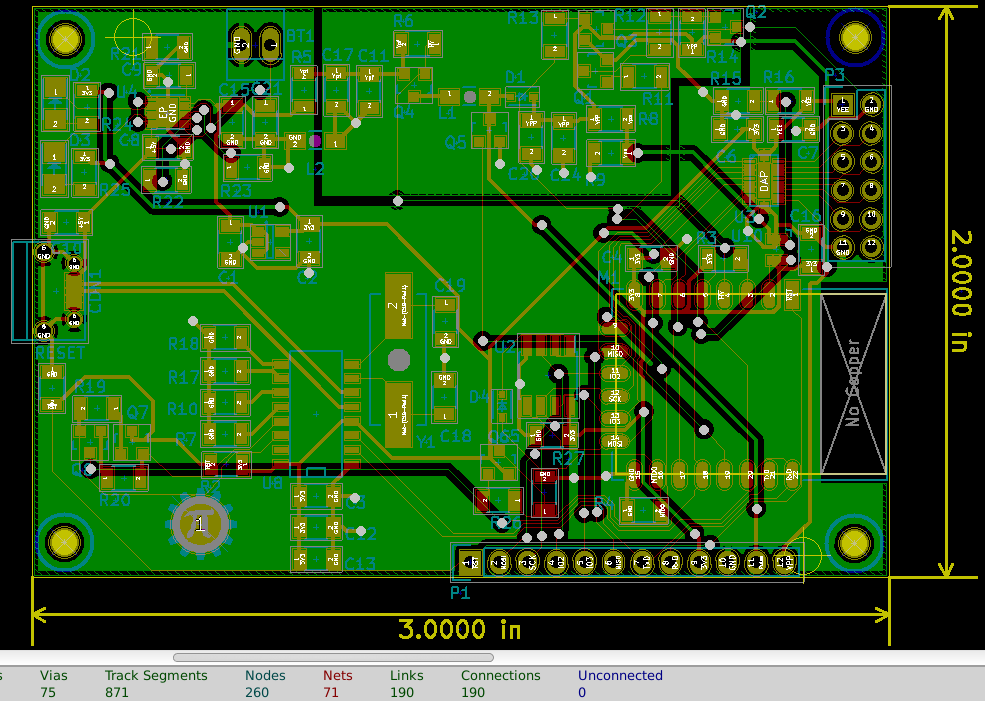
FinishedLayoutV00E

The kicad files are on www.github.com, use the link just below my logo to download them.

Do you have any comments, would you do something differently,  can you see a better placement of parts?

Design testing for layout

I tested the battery charging circuit this week. It failed.  The lithium cell would charge, but when I disconnected the power adaptor everything shut down.  I didn’t understand how the enable lines worked.  In my hurry, I missed an example circuit in the datasheet that closely matched my needs. Most importantly it showed where to connect the enable lines for “normal” operation.

So for my client, I connected a diode from the out line of the chip to the in line of the chip(where the enables were connected to). The diode makes sure the out line is controlled by the chip and it can manage the current correctly.  Note D5 in the schematic below.

D5addition

This works but it is kind of a hack.  Hacks are great for testing prototypes, doing one off designs, and temporary changes.  Hacks lead to problems in production, if at all possible hacks should be avoided on production runs.  The right way to connect this circuit for both the programmer and my client is to connect EN and ENO to the +5V rail and ENBAT to the battery positive terminal.  This configuration means that anytime power is connected to the power, it will supply system voltage from the +5V supply and charge the lithium cell with whatever current is left from the 450 ma I limited it to.  When the +5V rail is not powered, or under powered,the lithium cell supplies current to system.

LithiumChargerFixed

I modified the code to connect the sigma delta to GPIO13 to drive the level shifter signal, then connected 5 Volts to the Vt and measured the waveform on the pad that corresponds with GPIO 13 through the level shifter. It didn’t work, Or the DSO138 oscilloscope can’t read the sigma delta signals.  I found a recommended power up sequence of the the level translator chip that I hadn’t considered before, the /OE pin should be brought low after power up.  This is to prevent excessive currents, I shouldn’t get the results I am seeing, I decided to try just toggling the GPIO12, 13, 14 pins controlled by the serial communications.  The system has gotten very unstable, I decided to re-flash the user config and wifi calibration data.  Turned out that Vt was/is shorted to ground, My best guess is the Pad directly under the chip solder bridged to the Vt(Vccb) pin of the level shifter chip.  Time to lay out again.

Do you have any Ideas or suggestions that might be useful for this design? Would you do anything differently?

Electronics design review (Hardware V00D)

The circuit is almost ready to go to layout again. This week I took a close look at the schematic design to look for errors and unfinished tasks.  By the way, you can put notes on a schematic to help you find anything you put off for later.

I have received the PCBs for my client, but I haven’t had the chance to populate the first one yet.  This means I haven’t had a chance to test the charging circuit yet. The availability of inexpensive PCB fabrication like OSH park has made a mini PCB test run reasonably priced.  You can now design a development board that exactly meets your requirements very inexpensively.  Since each iteration of the this design isn’t costing a lot, I am testing multiple changes each time. This allows me to work with devices that I am completely inexperienced at very low risk.

I started with the lithium cell charging circuit. I verified the input from the micro USB connector is tied to the input of the management chip.  I copied the timing and current limit device values from my client’s design.  The lithium cell (connector) is connected to GND and the dedicated pin on the management chip.  The status outputs are tied to LEDs so I have some indication of what is happening during charging. I may try to incorporate these signals later in the design. The system power output is connected to the 3.3V regulator which is working well on the two test boards I have already built.

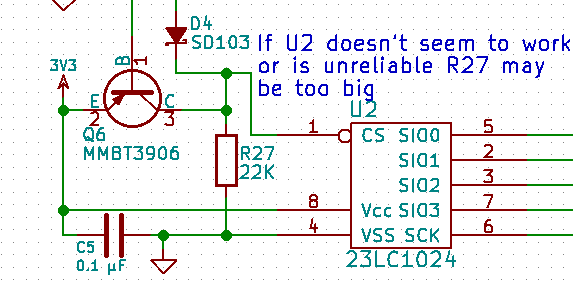
Next I looked at the SPI RAM Chip select logic.  The transistor Q6 turns on when CS0 is low; this pulls the chip select line for U2 high preventing U2 from contending with the SPI bus when the flash chip is being accessed.  There is a diode blocking the high from pulling GPIO15 high during reset. There is a pull down resistor for when GPIO15 is low and CS0 is high to activate U2 chip select. This is untested but the design looks like it will work.  I chose 22K resistors for the pulldowns on GPIO15 and U2 chip select as a balance between current required when GPIO15 is high and the speed at which U2 chip select will fall when released.  Since I don’t know the amount of capacitance of that circuit, I may have to change that resistor value later.  Good place to put a note on the schematic.

U2 Schematic notes

The level shifter U3 is untested, I should test it before I go to layout. Another note.

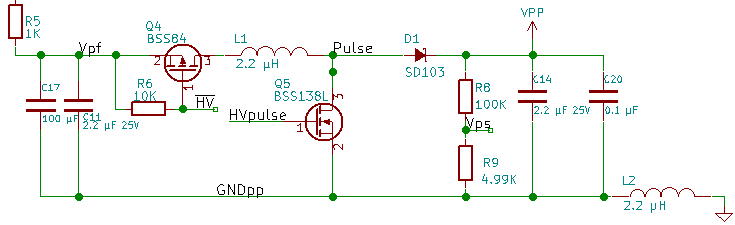
I decided earlier that the voltage booster was working but needs to have an isolated ground on the PCB layout.  I have added an inductor between the boost GND and the system GND.  This allows for some experimentation.  I can just bridge the pads with solder, I can put a resistor in there, or I can install the inductor. If isolating the GND is enough, that’s great.  The resistor would help provide better filtering but could cause problems.  The inductor is best filtering but will slow down signal transitions of the high voltage. I also gave the net name GNDpp to the isolated GND.

Vpp GNDpp isolation

The transistor driver for VPP is untested, because I haven’t had the positive voltage available. I could have attached a 12 volt source and tested it but it’s a simple circuit. It should work. The analog switch is working, nothing to review with it.

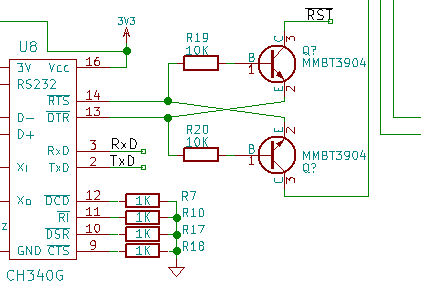
Finally, the programming control pins RST and GPIO0. I am not happy with the resistor connections. I have decided to copy the design from the NodeMCU dev board.  It is simple and works well on the dev board.  The only thing I am concerned about here is how much current the UART bridge pulls when not connected to USB.

CH340 Crossslink

Use the GitHub link to get a current copy of this design. After testing, I will go to layout.

I would love to hear any questions or suggestions.  If you would do this differently, please comment.

Battery and charger (Hardware V00C)

Last week I worked on a client design including a lithium cell charger.  For that design, only a  LiPo cell would fit the size requirements. I started by copying the design from the work I had already done on that other project.  The lithium cell charger has a reference design in the datasheet, so I implemented it as described in the datasheet and then adjusted values for my application.

Re-using designs can save a lot of time.  Not only do you not have to read/understand a new datasheet and reference implementation, prototype level testing has already been done.  I haven’t actually done the prototype level testing yet, but I will for the client before I re-layout the programmer.

Then I realized maybe I didn’t want to use a lithium cell for the programmer.  The advantage of a lithium cell is power density, and a simple prismatic(3d rectangular) shape.  The disadvantages of a lithium cell are fire risks, and high costs in low quantities.

The alternative for a lithium cell is a battery of 3 or 4 NiMH cells. Three cells in series would be 3.6 Volts. Four would be 4.8V. The advantages of NiMH cells are consumer availability and price, very low safety risks, no special requirements for shipping. The disadvantages are more complex charging, very little drop in price for large quantities, cylindrical cells aren’t very efficient for space, lower power density.

I chose to go with a battery of NiMH cells.  I feel the consumer availability, price, and easier shipping are very significant advantages for the programmer.

Maximum charge voltage per cell is 1.78V. Multiply that by 4 cells is 7.12V(not optimal for charging over USB port). Multiply that by 3 cells is 5.34V (This is close to the 5V I would get from USB). Being a little under maximum charge voltage will still work but limit maximum charge current.  Since I want to charge off of the USB  connection, limiting it to 500mA(or 0.5 Amps) or 100mA is a good choice.

After looking at price and complexity of charger ICs, I changed my mind. I will go with the lithium cell and charger. I chose the resistor values to charge at approximately 500mA with a time limit of 8 hours.  The chip manages current flow to the system and charging the lithium cell at the same time.

LithiumChargeCircuitV00C

I hope that you have found this blog of value, thank you for reading! I have uploaded the KiCad files to github.com. Use the link under the PI Gear logo to go get it.

SPI RAM testing (Firmware V00F)

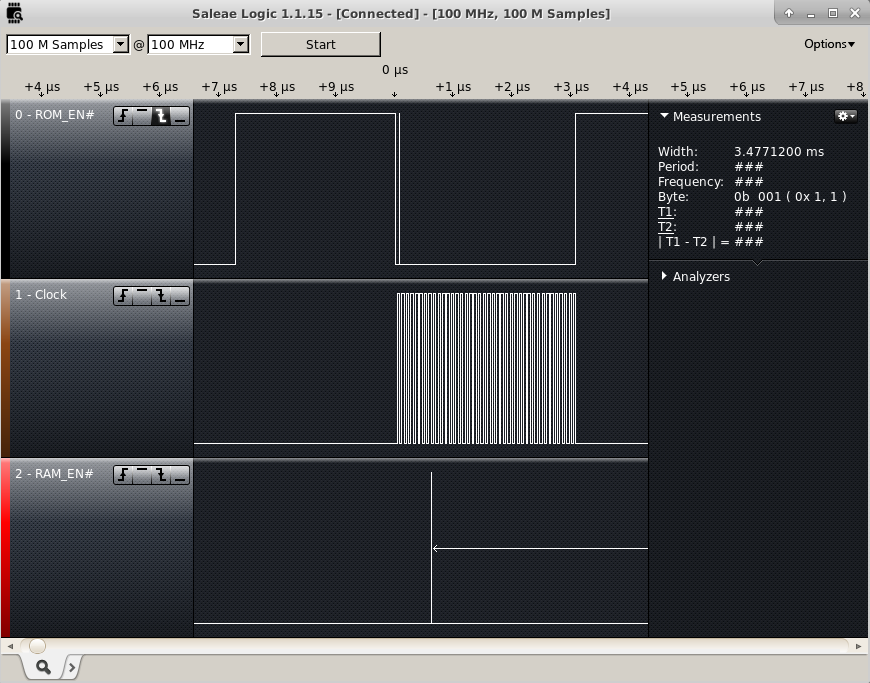
The SPI RAM was still unproven.  I want to test it before I do a new layout.  I checked the SPI lines with a Saleae Logic16 which unfortunately can only sample 3 lines at 100MHz  I was concerned that the SPI RAM would be on the SPI bus at the same time as the FLASH.  This could occur anytime the CS0 and the HSPI CS were low at the same time while the processor was writing or reading from the flash. So I connected to the two chip select lines and the SPI clock line. I triggered capturing off of the first falling edge of CS0.

SPI Enables

I configured GPIO15 to HSPICS at the beginning of user_init and it appeared to not make any difference.  I then changed it to a digital pin and set it high and still didn’t appear to make a difference. So I guessed something I was initializing was causing it to change back to the mode it had been in before.  I set the Pin to a Digital output and set it high at the end of user_init, and it worked.  Since that worked, I tried changing the last step in user_init to set up the SPI overlap configuration. This also works.  It looks like that for about 300 ms there is bus contention between the SPI RAM and the FLASH memories.  This has got to be solved before I go to a new layout.

What I need is to keep the SPI RAM CS line high anytime the FLASH CS is low but follow GPIO15 the rest of the time. It’s helpful to look at in a truth table.

GPIO9  | GPIO15 | SPI RAM
 CS0   | HSPICS |    CS
--------------------------
   0   |    0   |    1
   0   |    1   |    1
   1   |    0   |    0
   1   |    1   |    1

There is only one zero in the table, this means it can be represented as an or gate. If I invert CS0 and or the signals together I would get the results I want. I figured out a circuit that would work that just adds a transistor, a diode, and a couple resistors. A PNP transistor to pull the line up when CS0 is low and a diode to block the current when GPIO15 is driven low at the same time that the RAM CS is pulled high.  There will have to be a pulldown resistor to make sure the CS will go low when it needs to.

I have pushed these minor firmware changes to github.

SPI Overlap

Code Cleanup and Boost Circuit testing (Firmware V00E)

This week I was reading through the SDK documentation, and realized a better way of handling serial events.  I was setting a flag and using a software timer to handle those events once a second. I also found that there is a webserver example in the IOT example.  I think this server is much simpler than ESP Ginx.  I have decided to try to use this example to move forward in the design

I decided to set up an OS task that I can post to that will do things like display the serial menu.  I am already using a task for serial handling.  (I grabbed it from an example and modified it for my uses).

I started by changing the UART task to a more generic task. I changed uart_recvTask to taskHandler. Then I just call an os_event_post with the action I want taken.  This allows the system to decide when to start the action. Displaying the menu and other tasks will generally happen faster this way.

As soon as I tried to do anything with GPIO16, I got lots of reboots.  It seems that the problems I was having with the Voltage boost circuit may have actually been GPIO16 problems. I have moved the control pin from GPIO16 to GPIO13 for enabling the voltage boost circuit.  With GPIO13 connected to the base of Q4 to enable/disable the boost circuit, the firmware booted and worked reliably.  After that I changed the filter resistor back to 10 Ohms as I had originally specified. And… It didn’t boot.

I replaced the 10 Ohm resistor with a 100 Ohm Resistor.  Still wouldn’t boot. I found that if I could get Q4 turned off, then the system would boot and run reliably.  As soon as I turned Q4 back on, the system would reboot and hang. So I tried adding a 100 μF between +BATT and GND to try to filter any electrical noise. It didn’t work.

I connected a bench power supply set at 3.3V to the boost circuit input, and I got it to partially work. I got 8 volts out of it for a few seconds.  I reinserted the GPIO16 initialization functions and no problems when no power is connected to the boost circuit.

I added some code that allows me to increment or decrement the prescaler using + and – keys respectively. When I hit the – key when the prescaler was at 0 to get to 255, it would reboot. When I hit the + key to go from 99 to 100 it would reboot.  So for now the prescaler is limited to the range of 0 to 99.

I am encouraged by getting the voltage on VPP higher than any supply voltage on the board. It appears that I need to create a separate ground plane just for the boost circuit.  If I couple it to the main ground with a low value inductor, I might be able to eliminate the problems it has caused.  I have uploaded the new version of the code. It still has very little commenting, however, I think it is cleaner and easier to read.

Debugging

I got the Sigma Delta putting out a waveform that I was looking for. But when I connected the power rail to the input of the inductor for voltage boost, the system stopped booting correctly.

I had several possible problems to look at.

GPIO16 is tied to reset on some ESP8266 modules allowing wake from deep sleep based on the RTC. I tried taking it back out of the code and I am still getting unexpected boot up activity. Doesn’t appear to be the problem, I may have to come back and have another look.

I haven’t built with the change of memory maps until last week. The bootloader may not be linking properly with my code or I may have made some mistakes pertinent to the linker. I removed the new files and recompiled without GPIO16 support and therefore a smaller memory map that fits without modification of the link files. I commented out most of the code and it still would not boot into my code. Code doesn’t appear to be the problem.

Finally, the boost circuit may draw very large amounts of current that will cause noise back into the rest of the system.  Power may not be stable enough for reliable operation. I disconnected the 5V from the boost circuit and got reliable boot.  I need the boost circuit to work, so I replaced the 10 ohm resistor with a 68 ohm resistor( Maximum current draw from USB would be 5v/68Ohms or 74mA). It wasn’t enough. So I tried 220 Ohms, then I tried 1KOhms.  This means the maximum current I can provide to VPP is significantly reduced.  I will add capacitance to the PCB on the 5V lines to allow for better noise immunity. The board is booting reliably.  The problems I had earlier with the CH340G were probably related to this problem as well.  I still needed to run the CH340G at 3.3V, So I am glad I changed that already.

The boost circuit is not able to create a voltage above 5v with the 1K resistor. Testing the ADC reading, I discovered I had R8 and R9 Cross labelled on the board. So I switched the labels on the layout.

The firmware is running again.  I can put a pulse stream out to the Voltage Boost circuit but the 1K limiting resistor is too large to work correctly.


Functional testing for layout V00B

For testing purposes, I chose to put the code that I can control over a serial terminal into the ESP-12E. I had to make a few modifications for the new design.  The version for the last design/layout is archived on GitHub, I can easily go back to it if I find a need.

On the new design, several pins are different than before.  I changed the sigma delta output from GPIO2 to GPIO4 so it can drive the voltage boost circuit. I set GPIO16 to output low to turn on the voltage boost circuit, and I set GPIO2 to output low so that the boosted voltage would be on the programming header.

I had to make adjustments to the build environment to build esp-ginx.  Apparently I managed to break the build environment for the SDK in the process.  For esp-ginx I had updated to the newest version of the compiler toolchain.  This removed some symbolic links, so I couldn’t compile at all.  I fixed the symbolic links, and I am able to compile now, however it compiles without any errors but doesn’t make a binary file. Turns out I was in the wrong folder to link properly. Next the calls to GPIO16 causing a failure to compile. I needed to bring in the files gpio16.h and gpio16.c into the project.  Then the project failed to link with the errors “undefined reference to `gpio16_output_conf'” and “undefined reference to `gpio16_output_set'”.  This turned out to be where I placed the file gpio16.c, once I put it in the user folder, that error went away. Then I got a new Error “`.irom0.text’ will not fit in region `irom0_0_seg'” which means I ran out of code space.

While I was looking at the makefiles I noticed a section for configuring the memory in the sdk base folder. SPI SIZE MAP = 4 or 6  both match the ESP-12E. Setting it to 4 and then 6 didn’t fix the problem. Setting BOOT = new and APP to 1 got it to compile and link without errors.

I installed the new code and I get the menu up on my terminal window.

The sigma Delta doesn’t seem to be outputting anything on any pin. This means more testing.


Happy New Year

All the components have come in so I populated the board.  I discovered that I had ordered the wrong size for a resistor and a capacitor.  I was able to install them by bridging to them with solder. The bi-directional level shifter component is tiny and very hard to hand solder, I might be looking for an alternative to this component. I finished populating the board and added the Jumpers to fix my layout errors.

I started testing and it wouldn’t download firmware.  After hours of messing around with the design, I realized that GPIO2 was being held low through the transistor I had tied it to.  This changes the boot state. I replaced the bipolar transistor with an NChannel logic FET. GPIO15 needs to be low and GPIO0, and GPIO2 need to be High during a normal boot. GPIO15 and GPIO0 need to be low and GPIO2 needs to be high for bootloader boot.

On top of this I got my logic for Controlling RST and GPIO0 Wrong and had to modify esptool to get it to work with this design. I knew this was a possibility since I didn’t know whether DTR and RTS were supposed to be connected to RST and GPIO0 or reverse of that.  I now know that RTS is supposed to be connected to RST and DTR is supposed to connect to GPIO0 without inversion. I figured this out through experimentation.  I ended up changing the base resistors for the inverting transistors Q6,7 to 1K, removing Q6 and 7, and wiring a jumper from the resistor to the collector pad of each transistor footprint.  This allows me to program and test with unmodified versions of esptool.py and ESPlorer.

Part of the problems I had came from wiring the CH340G to 5V instead of 3.3V  I cut the supply trace and added a jumper from regulated 3.3V to pins 4 and 16 of the CH340G.

I loaded the NodeMCU firmware to verify the firmware loaded successfully. It worked well with ESPlorer. Finally, I loaded the web server firmware that I got running last week.  I have updated the schematic to reflect my changes and uploaded it to GitHub.

PopulatedPCB