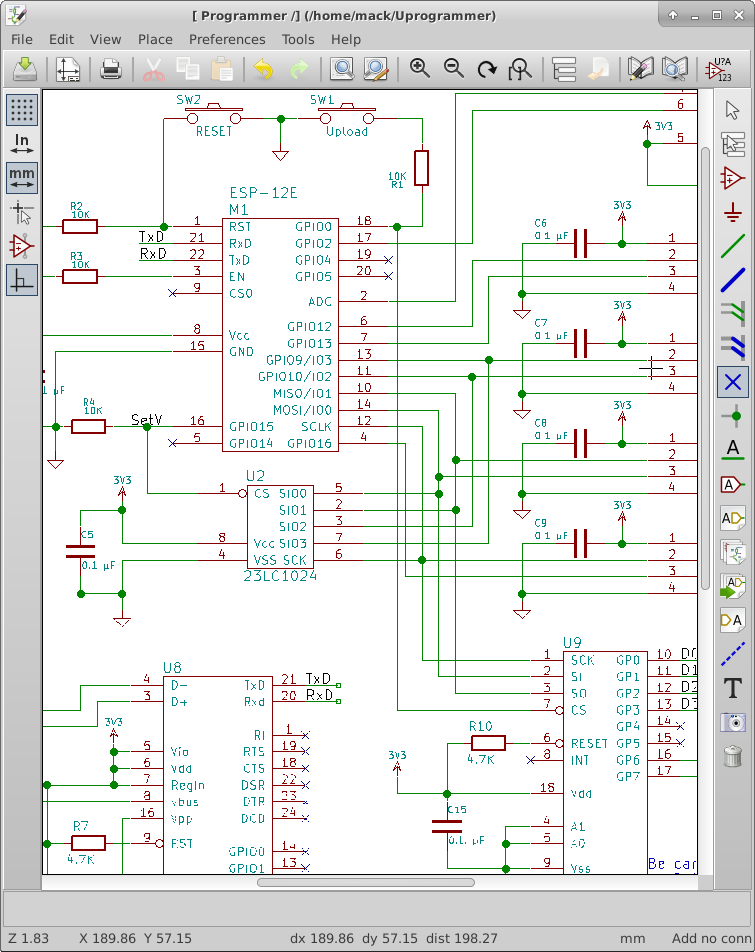
I found a big mistake. The pinout I had used for the design has the SPI pinout wrong. This means that the External RAM and the Port expander will not work until I fix this issue. So, I found an online layout image that shows the flash chip as well as the pins. I used esptool.py to request the flash ID. The Flash ID manufacturer code is C8 and the device code is 4016. Using Google, I found this to be the GD25Q32 made by GigaDevice. This is a 4MByte spi/qspi flash chip. I looked up the datasheet and found the following pinout.
1 CS#-------VDD   8
2  SO|     |Hold# 7
3 WP#|     |SCLK  6
4 VSS-------SI    5

CS#.....Active Low Chip Select
SO......Serial Data Output/ IO1 (Quad/Dual IO)
WP#.....Active Low Write Protect/IO2 (QuadIO)
SI......Serial Data Input/IO0 (Quad/DualIO)
SCLK....Serial Data Clock
Hold#...Active Low Hold/IO3 (QuadIO)
VDD/VSS.Power Connections
Looking at the ESP-12E Module layout, I found the following connections by tracing the tracks:
Flash CS# is connected to Pin 9 — No Change
Flash SO is connected to Pin 10 — No Change (MISO)
Flash IO2 is connected to Pin 11 — Requires a Change
Flash SI is connected to Pin 14 — Requires a Change (MOSI)
FLash SCLK is connected to Pin 12 — Requires a Change
Flash IO3 is connected to Pin 13 — Requires a Change
I also discovered that if I want to use the Built in SPI Chip selects, I need to use GPIO0(CS2) or GPIO15(HSPI_CS). TxD is CS1 which is a conflict for testing so I can’t use CS1. I found this in esp8266 datasheet.
To fix the pinout on the schematic, I went into the library editor and just changed the pin numbers. I left the pin order in place for the schematic.
For the Chip Selects, I connected the RAM CS# to GPIO15(HSPI_CS) and the port expander to GPIO0(CS2).
I have some other schematic changes to make, I am still considering changing to the CH340G USB serial bridge. The problems that I have had have given me reason to consider not using it. I may have a faulty chip, I will test with another one, and if the problem goes away, I will feel more confident changing to the less expensive chip.
I have added the SPI and SPI overlay library code to the project source. No functionality has changed, so I am not uploading the code to GitHub yet.