Project Custom Library in KiCad

A custom library is helpful for organizing your project files.  In this case where I want to share my design with my readers, the new/unique parts and footprints will be created in a new library called Programmer.


I created a new project called “Programmer” and saved it in a new folder called Uprogrammer in my home directory. I ran the eeschema from the KiCad dashboard.  I then ran the library editor, selected a library. Then I created and exported a component and saved it to programmer.lib in the project directory.

I added this library to the KiCad library list, and then opened it to edit. I added the pins and made it look the way I want it in the schematic.
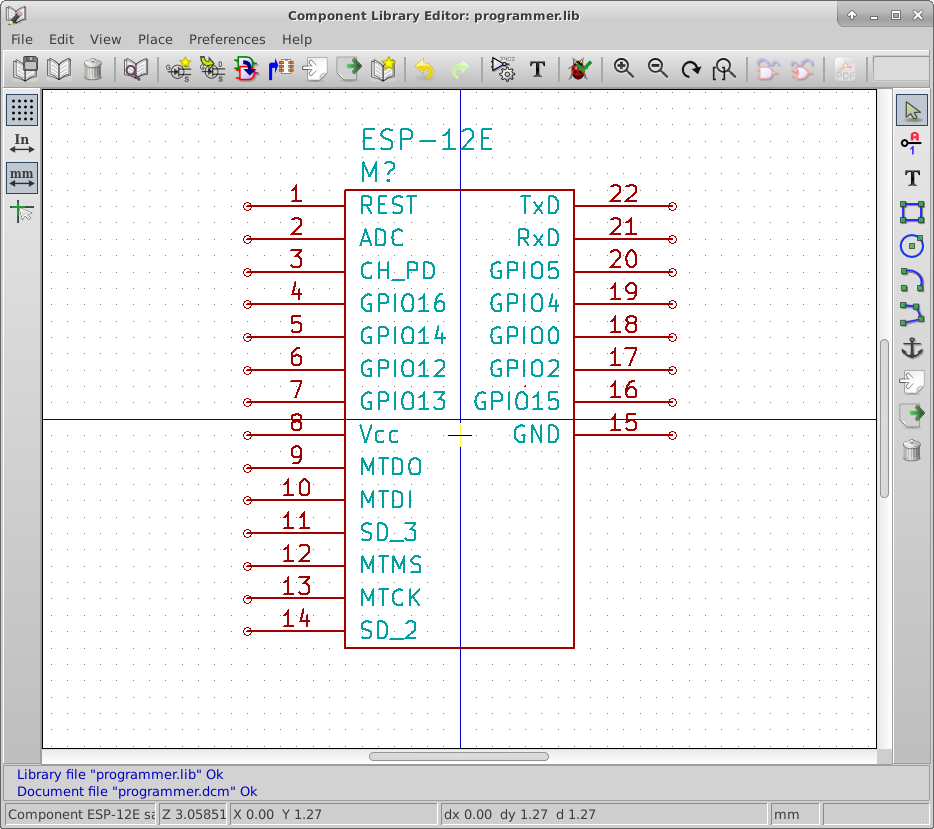
Library edit

In looking for the pinout, I found out that there is a newer model of the ESP-12.  It is the ESP12E  It has 6 more pins that may be beneficial to the project. Click below to get this version of the library. I do expect this library to change as the project progresses.

Download zipped library file with ESP-12E.

KiCad EDA tools

I have never used the KiCad toolset.   The schematic capture tool I am familiar with is an older version of OrCad.  The industry tools have changed a lot, I expect a steep learning curve.

KiCad is open source, and free to use.  I will be posting my schematics, layout files, and new part libraries. This allows you to edit and suggest changes/ideas along the design path.

KiCad is available on Windows, Mac, and Linux machines.


KiCad is in the Ubuntu Software Center.  This makes installing as easy as searching for “KiCad” selecting the install package, and click on install.  The software center prompts me to authenticate and I proceed with the install.  I also selected the English help file to download with the install. The version I installed is 2013-jul-07 Stable.

Ubuntu Studio places the KiCad Launcher in the Development menu folder. I ran it and got a dashboard for all the tools that come along with KiCad. This dashboard also helps manage projects.

Kicad Dashboard

There are tutorials linked to from the KiCad Website that I will be checking out this week.

Radio Choice

I have decided on the radio I will use.  I plan on using the ESP8266 ESP12 WiFi module.  In the last few months, the maker community has made a lot of progress with these modules.  These modules have castellated solder pins which are relatively easy to hand solder.

The lack of documentation is a bit worrysome.  I don’t know if I will need another processor or not.  So I will get one of these in and start tinkering with it. It looks like the research here is going to require physical testing and experimenting.

I have found it available at Alibaba, Adafruit, and Amazon.

TAPR Open Hardware License (OHL)

The TAPR Open Hardware License (OHL) is the only license I am considering that is written specifically for hardware and patent law.  It requires that any derivative works be licensed the same.  It requires distribution of all modified works to include the originals unmodified.


This license restricts what a developer can do with the design.  I am hoping that this product has enough value to developers that they would contribute to the design.  With that premise, I would not like other developers to be limited significantly on how they can use the intellectual property.

I am going to use the MIT license for both hardware and software.  I don’t need patent/copyright protection on this product.  Liability protection is a good thing, I intend this product to be “hackable”. Anything submitted to this blog for product design will be considered under the MIT license unless noted otherwise.

Creative Commons

There are several flavors of the Creative Commons license.  I am going to look at the attribution and attribution share alike licenses.

Both licenses are very similar to the modified BSD license and are more explicit about what rights are conveyed by the license. Both require attribution to the author without endorsement from the author.

The share alike requires any derivative works be licensed with the same license or a compatible one.


For this project, I don’t see any advantage this gives me for the final product.  I hope to build and sell these programmers, but if someone else does for a decent price, I would still benefit.

I have to pick a license or make it public domain or someone else could license or patent it in a way that would restrict me or anybody else from building and selling it.

I am applying common design principals in this project. I do not believe there will be anything unique enough to patent.

Modified BSD license for Hardware

The Modified BSD license is pretty much the same as the MIT license plus it prohibits using the name of the copyright holder for promotion.

I am getting most of my information about these licenses from here.


For myself, I don’t care if someone uses my name for promotion.  This license doesn’t help me over the MIT license.

If someone else submits designs, or software to the project, they may use this license without any conflict with the MIT license.

MIT License applied to hardware

The MIT license gives a lot of freedom to developers to use the intellectual property in any way they want.  This includes manufacturing, selling, and modifying the design. It does not require or restrict attribution. It does give the designer some protection for liability.  This is not compatible with more restrictive licenses.


The reasons I want to design this product include:

  • Teaching about electronics design
  • Create a low cost universal In Circuit Chip programmer

If some company picks up this design and produces it at a fair price then both objectives are met. This would create a well documented hackable device for a very reasonable price.

The MIT license for software and hardware is compatible with my goals.

If I want to integrate some other design with more a restrictive license, I would have to switch to the more restrictive license or separate the other design into a module or in the case of software a library.

I will continue to look at other software and hardware licenses.

Don’t reinvent the wheel

There are a lot of hardware and software designs that can be used for your own project. Sometimes this design may fit your needs without any modifications. Of course you could also end up spending more time modifying the design than you would have spent designing it yourself.

Research is important when deciding whether or not to use designs developed by someone else. It is important to look at licensing to decide if the license is compatible with your license choices. Readability and documentation are also important factors in the decision.

If you have the budget, you can buy the design.  There is also public domain and open source designs to choose from as well.


This project is not very exotic.  There is probably a lot of free and open source designs available that I will be able to incorporate into the design, especially in the software. I still haven’t decided on the licensing for this project.  There are several common open source licenses for software and probably similar hardware licenses.

Radio Option 4

The EMW3162 is a Wifi module with an integrated ARM Cortex M3 processor running at 120 MHz.  Having the processor integrated into the module eliminates some of the more difficult layout requirements. Most of the potential RF problems are already taken care of by the module designers.

The clock for the SPI will be running around 30 MHz in extreme cases.  At this frequency I might have to treat the signal paths as RF and will probably need filters and shielding.

Note: RF means Radio Frequency. It is used here to denote any signals that could escape the system as radio waves and cause interference.


Device Advantages

  • Integrated ARM processor with 30 Mbps SPI interface
  • 5 V tolerant pins
  • USB capabilities (possibly used to update firmware/or configure wifi)
  • simplifies hardware design
  • About US $10 each
  • 1 MB Code space(should be more than enough providing WiFi Stack is not huge)
  • Several different library options.

Device Disadvantages

  • Share processor with WiFi stack
  • Will need better understanding than stand alone wifi/bluetooth stack (This means longer learning curve)
  • I am unfamiliar with STM32 processors

Processor Option 3

The MSP432P401RIRGC is an ARM Cortex M4F processor.  It has a web based IDE (integrated development environment). It has six serial communication modules and runs up to 48 MHz. This chip started out looking good, however it doesn’t look very good after a little bit of research.  A quick look back at the Microchip processor (Processor Option 2) showed me that this processor is probably not a good fit for this design.  Unless I eliminate the other processor options, I will not use this chip.  The chip not being available yet plays a large part of this decision. If it becomes available before I start prototyping, I may change my mind.

Side Note:

For my abbreviations I will always use an upper case B to represent bytes and a lower case b to represent bits.  For instance 1,000 bytes will be represented as 1 KB and 1,000,000 bits will be represented at 1 Mb.


MSP432P401RIRGC

Device Advantages

  • SPI up to 16Mbps with DMA
  • 256 KB Flash code space
  • 64 KB RAM space (16 bit address pointers are very easy to work with in C)

Device Disadvantages

  • Not available yet
  • Large pin count (64 pin for smallest variant)
  • No DIP part for prototyping
  • US $5.59 in quantities of 1K (Kind of high) may come down when released.