Electronics design review (Hardware V00D)

The circuit is almost ready to go to layout again. This week I took a close look at the schematic design to look for errors and unfinished tasks.  By the way, you can put notes on a schematic to help you find anything you put off for later.

I have received the PCBs for my client, but I haven’t had the chance to populate the first one yet.  This means I haven’t had a chance to test the charging circuit yet. The availability of inexpensive PCB fabrication like OSH park has made a mini PCB test run reasonably priced.  You can now design a development board that exactly meets your requirements very inexpensively.  Since each iteration of the this design isn’t costing a lot, I am testing multiple changes each time. This allows me to work with devices that I am completely inexperienced at very low risk.

I started with the lithium cell charging circuit. I verified the input from the micro USB connector is tied to the input of the management chip.  I copied the timing and current limit device values from my client’s design.  The lithium cell (connector) is connected to GND and the dedicated pin on the management chip.  The status outputs are tied to LEDs so I have some indication of what is happening during charging. I may try to incorporate these signals later in the design. The system power output is connected to the 3.3V regulator which is working well on the two test boards I have already built.

Next I looked at the SPI RAM Chip select logic.  The transistor Q6 turns on when CS0 is low; this pulls the chip select line for U2 high preventing U2 from contending with the SPI bus when the flash chip is being accessed.  There is a diode blocking the high from pulling GPIO15 high during reset. There is a pull down resistor for when GPIO15 is low and CS0 is high to activate U2 chip select. This is untested but the design looks like it will work.  I chose 22K resistors for the pulldowns on GPIO15 and U2 chip select as a balance between current required when GPIO15 is high and the speed at which U2 chip select will fall when released.  Since I don’t know the amount of capacitance of that circuit, I may have to change that resistor value later.  Good place to put a note on the schematic.
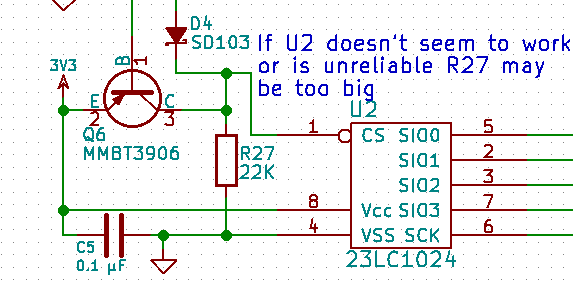
U2 Schematic notes

The level shifter U3 is untested, I should test it before I go to layout. Another note.

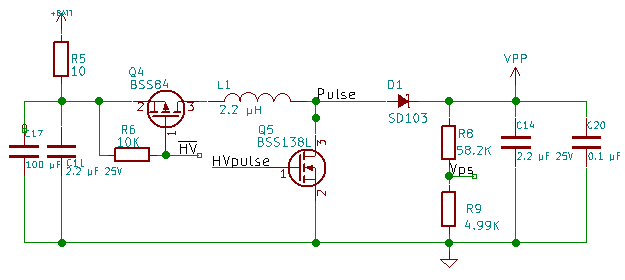
I decided earlier that the voltage booster was working but needs to have an isolated ground on the PCB layout.  I have added an inductor between the boost GND and the system GND.  This allows for some experimentation.  I can just bridge the pads with solder, I can put a resistor in there, or I can install the inductor. If isolating the GND is enough, that’s great.  The resistor would help provide better filtering but could cause problems.  The inductor is best filtering but will slow down signal transitions of the high voltage. I also gave the net name GNDpp to the isolated GND.
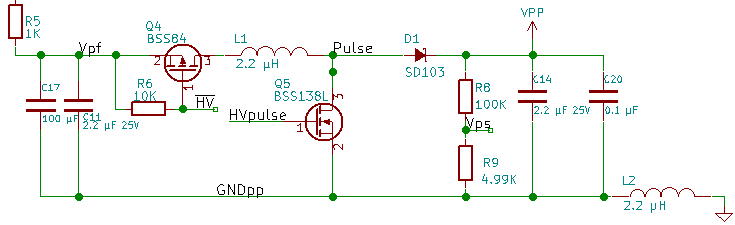
Vpp GNDpp isolation

The transistor driver for VPP is untested, because I haven’t had the positive voltage available. I could have attached a 12 volt source and tested it but it’s a simple circuit. It should work. The analog switch is working, nothing to review with it.

Finally, the programming control pins RST and GPIO0. I am not happy with the resistor connections. I have decided to copy the design from the NodeMCU dev board.  It is simple and works well on the dev board.  The only thing I am concerned about here is how much current the UART bridge pulls when not connected to USB.
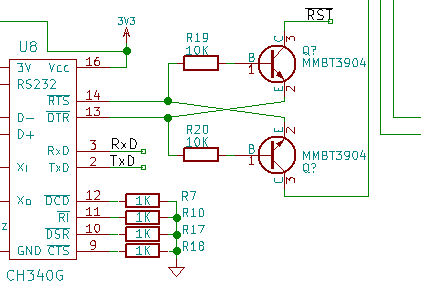
CH340 Crossslink

Use the GitHub link to get a current copy of this design. After testing, I will go to layout.

I would love to hear any questions or suggestions.  If you would do this differently, please comment.
SPI RAM testing (Firmware V00F)

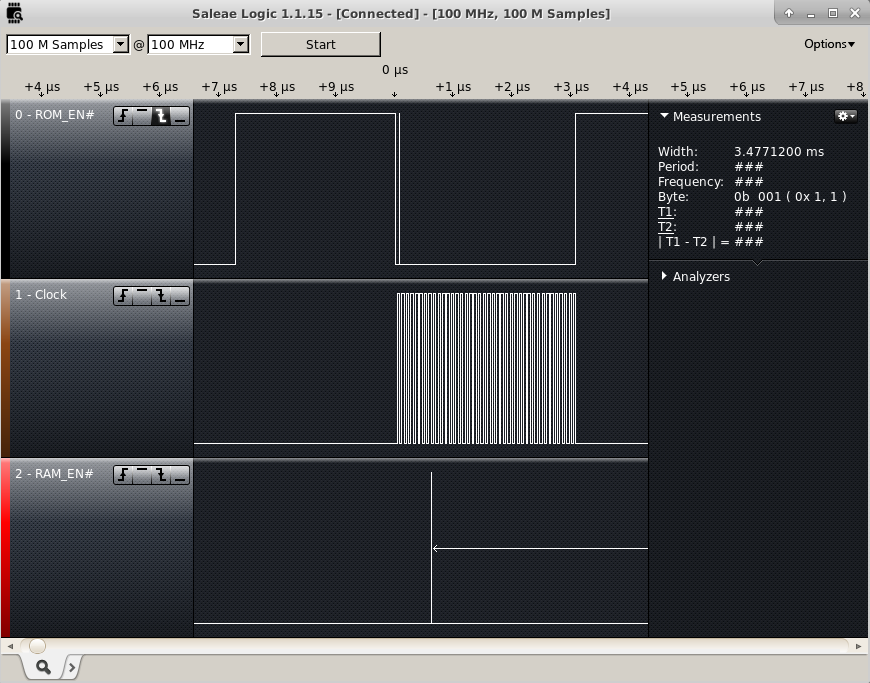
The SPI RAM was still unproven.  I want to test it before I do a new layout.  I checked the SPI lines with a Saleae Logic16 which unfortunately can only sample 3 lines at 100MHz  I was concerned that the SPI RAM would be on the SPI bus at the same time as the FLASH.  This could occur anytime the CS0 and the HSPI CS were low at the same time while the processor was writing or reading from the flash. So I connected to the two chip select lines and the SPI clock line. I triggered capturing off of the first falling edge of CS0.

SPI Enables

I configured GPIO15 to HSPICS at the beginning of user_init and it appeared to not make any difference.  I then changed it to a digital pin and set it high and still didn’t appear to make a difference. So I guessed something I was initializing was causing it to change back to the mode it had been in before.  I set the Pin to a Digital output and set it high at the end of user_init, and it worked.  Since that worked, I tried changing the last step in user_init to set up the SPI overlap configuration. This also works.  It looks like that for about 300 ms there is bus contention between the SPI RAM and the FLASH memories.  This has got to be solved before I go to a new layout.

What I need is to keep the SPI RAM CS line high anytime the FLASH CS is low but follow GPIO15 the rest of the time. It’s helpful to look at in a truth table.

GPIO9  | GPIO15 | SPI RAM
 CS0   | HSPICS |    CS
--------------------------
   0   |    0   |    1
   0   |    1   |    1
   1   |    0   |    0
   1   |    1   |    1

There is only one zero in the table, this means it can be represented as an or gate. If I invert CS0 and or the signals together I would get the results I want. I figured out a circuit that would work that just adds a transistor, a diode, and a couple resistors. A PNP transistor to pull the line up when CS0 is low and a diode to block the current when GPIO15 is driven low at the same time that the RAM CS is pulled high.  There will have to be a pulldown resistor to make sure the CS will go low when it needs to.

I have pushed these minor firmware changes to github.

SPI Overlap

Design Review V00B

Design reviews should be done often, at least just before a new design goes to fabrication.

During testing I had wished for some test pins at the edge of the PCB for verification. I want to add and label test pins for Reset, Txd, Rxd, 3.3V, SCK, MOSI, MISO, IO2, IO3 and L1 pulse.

I added these testpoints to the schematic along with a ground that’s easy to get to. I am putting them into a through hole 1×12 connector. I moved P1 test into the same header. In layout, I’ll place this connector next to the edge where I can get a clip lead connected for testing.

USB to Uart chip completely changed, copied reference design from NodeMCU design. It’s helpful to look at a second design for a sanity check. Everything matches up to an Arduino clone schematic found on the web.  I had left DCD, RI, DSR, and CTS unconnected.  Leaving inputs unconnected can cause problems.  These connections may have internal pullups/pulldowns but I couldn’t find any reference to that in the datasheet. Each of these lines indicates data is ready to flow when held low, I put pulldowns on each of them.

I had changed the SPI connections to correct the mistakes I had made earlier, I have gone back to verify these connections and found conflicting information. I traced the gerber image I had found to get the pinout I currently have. If it’s not correct, I will have the test pins to help me figure out the  correct pinout.

I had replace the port expander with a shift register still using the SPI to fill the register. According to the datasheet, the data shifted in will be latched on the rising edge of the RCLK pin.  If I treat RCLK as a Chip Select Pin on the SPI, a one byte write will set all of the outputs very quickly. This appears that it will work well.

The VPP circuit changes are a big gamble. I don’t know if it will work.  I am adding a 0.1 µF capacitor to the output to reduce output noise.  I am adding a 10 Ohm resistor and a 100 µF capacitor to filter noise from getting back into the rest of the system. I need to isolate the ground of the high voltage circuit to only connect to regular GND Net at only 1 place on the layout. This will help reduce noise transfer back into the rest of the system. The design update is on GitHub, use the link in the upper right hand of the page.

V00BVPPCircuit

External RAM

I found a big mistake.  The pinout I had used for the design has the SPI pinout wrong.  This means that the External RAM and the Port expander will not work until I fix this issue.  So, I found an online layout image that shows the flash chip as well as the pins.  I used esptool.py to request the flash ID.  The Flash ID manufacturer code is C8 and the device code is 4016.  Using Google, I found this to be the GD25Q32 made by GigaDevice.  This is a 4MByte spi/qspi flash chip.  I looked up the datasheet and found the following pinout.

1 CS#-------VDD   8
2  SO|     |Hold# 7
3 WP#|     |SCLK  6
4 VSS-------SI    5

CS#.....Active Low Chip Select
SO......Serial Data Output/ IO1 (Quad/Dual IO)
WP#.....Active Low Write Protect/IO2 (QuadIO)
SI......Serial Data Input/IO0 (Quad/DualIO)
SCLK....Serial Data Clock
Hold#...Active Low Hold/IO3 (QuadIO)
VDD/VSS.Power Connections

Looking at the ESP-12E Module layout, I found the following connections by tracing the tracks:

Flash CS# is connected to Pin 9 — No Change

Flash SO is connected to Pin 10 — No Change (MISO)

Flash IO2 is connected to Pin 11 — Requires a Change

Flash SI is connected to Pin 14 — Requires a Change (MOSI)

FLash SCLK is connected to Pin 12 — Requires a Change

Flash IO3 is connected to Pin 13 — Requires a Change

I also discovered that if I want to use the Built in SPI Chip selects, I need to use GPIO0(CS2) or GPIO15(HSPI_CS).  TxD is CS1 which is a conflict for testing so I can’t use CS1.  I found this in esp8266 datasheet.

To fix the pinout on the schematic, I went into the library editor and just changed the pin numbers. I left the pin order in place for the schematic.

For the Chip Selects, I connected the RAM CS# to GPIO15(HSPI_CS) and the port expander to GPIO0(CS2).

I have some other schematic changes to make, I am still considering changing to the CH340G USB serial bridge.  The problems that I have had have given me reason to consider not using it.  I may have a faulty chip, I will test with another one, and if the problem goes away, I will feel more confident changing to the less expensive chip.

I have added the SPI and SPI overlay library code to the project source. No functionality has changed, so I am not uploading the code to GitHub yet.

HSPIconnections

Change in Design

I changed my mind, I think the programmer should be able to be reprogramed without any special tools.  This means that the Microchip processor is getting removed and replaced with a USB to serial bridge.  I have decided on the Silicon Labs CP2104 USB to serial bridge. My decision is based on cost and minimal external components. I went to several suppliers and compared 1K quantity prices.  I also confirmed that I can used the built in USB VID and PID.

I followed the example circuit in the datasheet for the CP2104 making minimal connections for a self powered device.  Since I am going to eventually have a battery that is the correct mode to wire for.

Since I no longer have the Microchip processor to control the high voltage, I connected the SET line of the AAT1230 to GPIO15 of the ESP12E.  The pulldown on GPIO15 will keep the voltage regulator disabled during a reset and I will drive it low anytime I am not using it, minimizing the current it draws from the battery.

I connected the Feedback voltage from the high voltage and the target voltage divider into an analog SPDT switch(NC7SB3157 chip) and connected the common terminal to the ADC input of the ESP-12E.  This allows me to verify what voltage the target system is at and what Vpp voltage is maintained during programming.  I ran out of IO pins on the ESP-12E, so I am added an SPI port expander(MCP23S08).  I have to give up 1 pin for chip select but I gain 8 general purpose IO pins.  So I moved the data direction control pins to the port expander and then connect GPIO5 to the CS line of the port expander. I verified the port expander could operate at 3.3V to match my operating voltage.

I connected GPIO2 to the Switch select line of the analog switch.  A high selects the VPP voltage divider, a low selects the Target voltage divider.  The voltage dividers are necessary because I could be dealing with more than the 3.3 V that the ESP-12E can handle.

None of the new devices were in the libraries.  I had to create each of the MCP23S08, the CP2104, and the NC7SB3157 in the schematic library.  I still have to connect the Vpp line to the target connector where I can leave it high impedance, set it to high Voltage, or Ground it.

USB Bridge and Vpp Port expander and Analog switch

SPI RAM

The Esp8266 family have limited ram for both running firmware and for storing data.  To store large blocks of data it makes sense to have external RAM.  Since I want to transfer large blocks of data to program target applications I am adding external ram to the SPI bus.  Microchip makes a 1 Mbit SQI interface serial RAM.

Note: SQI is a version of SPI where the data is read/written 4 bits at a time.

To interface with SQI RAM I had to research how the SPI pins are connected to the flash memory.  I searched on the web for the ESP-12e Flash chip.  The clearest result(not necessarily accurate) is the Winbond W25Q32BV.  I downloaded its datasheet along with a photoplot of the  ESP-12E routing.  I followed the signal traces of each pin  from the Winbond flash chip to the edge of the board.  The following table represents the signals and their pins on the edge of the board.  This is based on very limited understanding of the ESP-12E.

ESP-12E Pin #    Signal    Notes
9                CS        Don't use this, it is chip select for  the flash chip
10               MISO/IO1  Should be available when firmware is loaded into ram
11               IO3       SQI IO Pin
12               IO2       SQI IO Pin
13               MOSI/IO0  Should be available when firmware is loaded into ram
14               SCLK      Clock for all SPI and SQI data

The individual chip select lines determine which device is on the SPI/SQI bus.

This research led me to change the ESP-12E part in the library to reflect the signals, I have added a new chip to the library for the Microchip serial flash and attached the appropriate signals along with GPIO15 for the chip select.

SQI RAM

Initial Connections

As I start connecting signals on the schematic, I look at which pins have dedicated functions.  The dedicated functions I need, I handle first.  This allows me to adjust the rest of the design around the required elements.  To make the schematic easier to read, I try to avoid crossing traces.


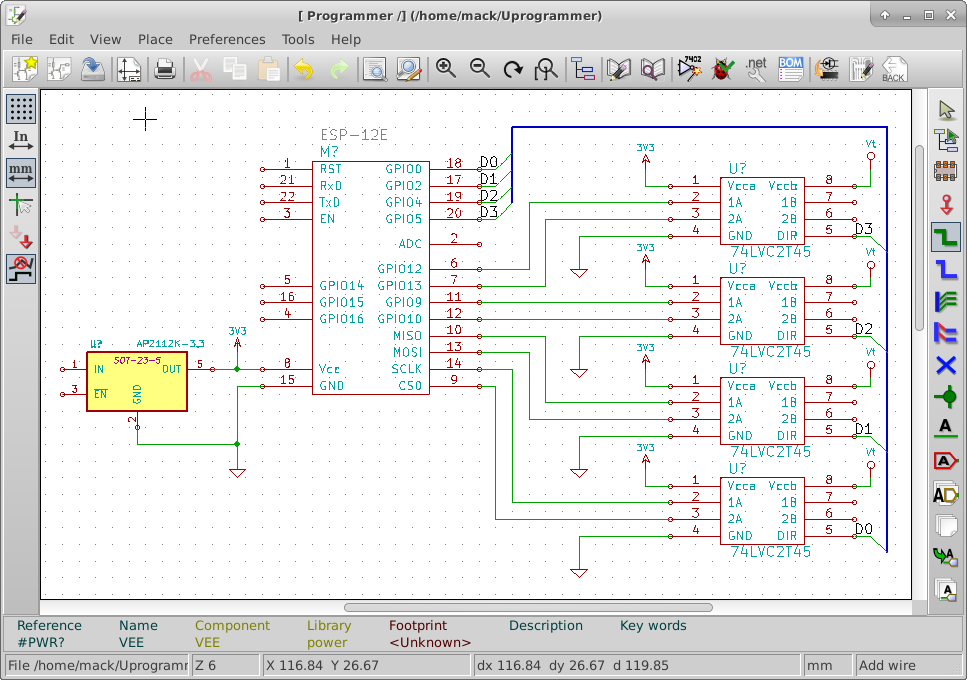
I went into the library editor and moved the pins of the ESP-12E around to make it easier to read the schematic.

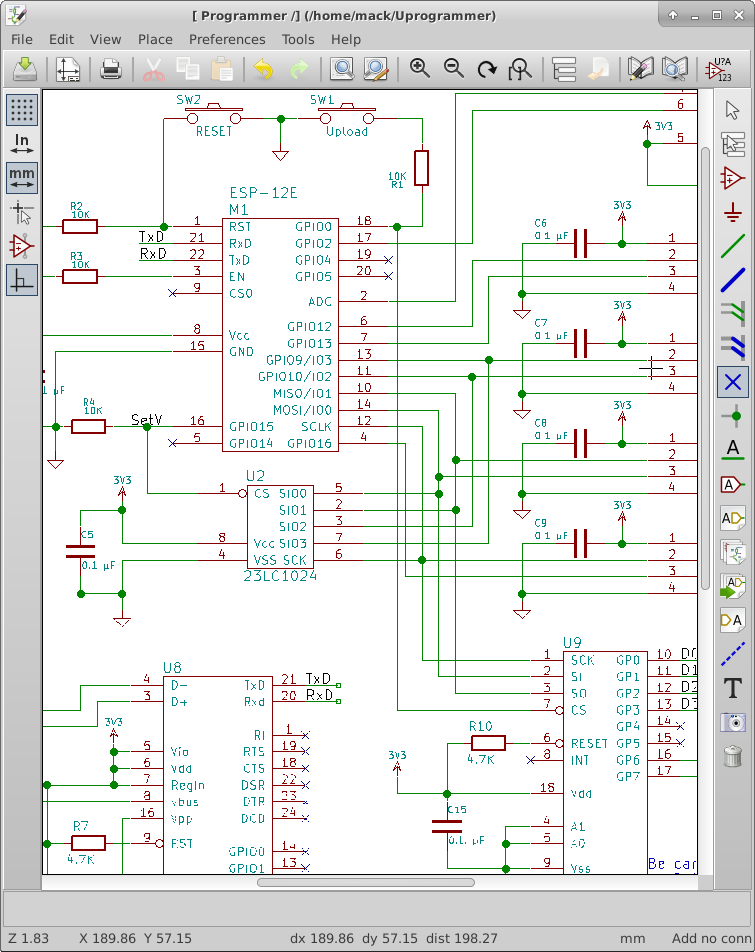
I have connected the SPI pins from the ESP-12E to the level shifter chips.  I have also connected four GPIO pins to the level shifter chips.   I have placed the 3.3V power connections to each of the level shifter chips and the ESP-12E. I have also tied the 3.3V regulator to the 3.3V power bus. I connected GPIO0, GPIO2, GPIO4, GPIO5 to the direction pins of the level shifter chips.  I have also connected Vt to the level shifter chips. this voltage will come from the target to be programmed.

I have ordered 5 ESP-12E boards from Ebay.  I should receive them within 30 days.  Once I receive them, I will start doing a basic hello world project.

Initial Connections

Processor Option 3

The MSP432P401RIRGC is an ARM Cortex M4F processor.  It has a web based IDE (integrated development environment). It has six serial communication modules and runs up to 48 MHz. This chip started out looking good, however it doesn’t look very good after a little bit of research.  A quick look back at the Microchip processor (Processor Option 2) showed me that this processor is probably not a good fit for this design.  Unless I eliminate the other processor options, I will not use this chip.  The chip not being available yet plays a large part of this decision. If it becomes available before I start prototyping, I may change my mind.

Side Note:

For my abbreviations I will always use an upper case B to represent bytes and a lower case b to represent bits.  For instance 1,000 bytes will be represented as 1 KB and 1,000,000 bits will be represented at 1 Mb.


MSP432P401RIRGC

Device Advantages

  • SPI up to 16Mbps with DMA
  • 256 KB Flash code space
  • 64 KB RAM space (16 bit address pointers are very easy to work with in C)

Device Disadvantages

  • Not available yet
  • Large pin count (64 pin for smallest variant)
  • No DIP part for prototyping
  • US $5.59 in quantities of 1K (Kind of high) may come down when released.


Processor Option 2

The Microchip PIC32MX110F016B.

I went to Microchip’s website and worked through their parametric search tools.  I was looking for a device that could use the SPI interface at at least 10 Mbps and at the lowest cost.  There were no 8 bit parts that could meet the SPI requirement.  There were some 16 bit parts that could meet this requirement, but they were the high end parts.  I had to look into the datasheets to see the maximum SPI baud rate.  Since JTAG does not have 8 bit fixed width registers, I will probably have to play some tricks to use the standard SPI for JTAG operation.


Microchip PIC32MX110F016B

Device advantages

  • Two Fast SPI channels (1 for programming, 1 for data storage)
  • DMA transfers for each SPI channel– Frees software up to do data manipulation tasks
  • 5 V tolerant pins
  • I am familiar with Microchip and their IDE — MPLAB X
  • US $1.73 each in quantities of 100
  • Compatible upgrade path if this chip isn’t enough
  • Low pin count — 28 pins
  • Dip Part for prototyping

Device Disadvantages

  • I am unfamiliar with microchip 32 bit architecture
  • Limitations on free C compiler — mostly in optimization