Javascript

Merry Christmas!

The PCBs came in today, they look great.  Of course I will need to make the modifications I mentioned last week.  I haven’t received the CH340G chips yet. I will wait until I receive them before I start building.

Rev00BPCBs

This week, I wanted to add  a slider to set the Sigma Delta output that drives the voltage booster to the web interface.  I didn’t know javascript at all so, I went to an online tutorial at Codecademy.com. This tutorial is very basic and even explains the basic concepts of programming in general.  I didn’t learn enough to set up a slider, I did learn enough to do some testing.

I quickly got the Sigma Delta output working in GPIO12 by copying the necessary code from the test project I was using. I then added a call to config_sigma_delta() from user_init() in user_main.c.  I also added a call to set_sigma_delta_duty() from my test code in cgi_relay.c.  Of course I added includes to sigma_delta.h in both of those files.  I then changed the Sigma Delta output from GPIO12 to GPIO4 to match the HV_pulse line used to run the switched coil.

Now if I hit the say Hello button, It changes the Sigma Delta output duty cycle. also, the Chart on the index.html page gives the current reading from the ADC once every 5 seconds.

ADCandSDelta


Web Server feature customization

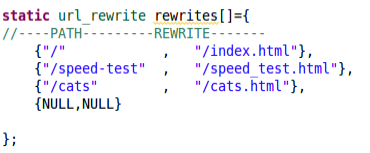
I found out why my URLs without .html on the end weren’t being handled the same as the rest.  There is an array defined in app.c that maps URL paths to alternate paths.

URLsI haven’t found the code that uses this yet, but it seems pretty straight forward what this is used for.

In the function init_http_server in app.c I found several functions that I think I don’t want.  I put a // at the beginning of those lines so that the compiler treats those lines of code as comments.  This is called “commenting out”.  This is useful when removing code that you suspect has an error, or , as in this case, I suspect I can remove.

I don’t need the captive portal. I am happy if users can use the IP address to get to the web server.  Having a domain name and using the web server from within a local network complicates things.

I commented out the lines:

    http_server_bind_domain(INTERFACE_DOMAIN);
    http_server_enable_captive_portal();
and
    http_server_bind_urls((http_server_url *)&api_urls);

I compiled with these changes, “crossed my fingers”, and uploaded. And… I got a continuous stream of reboots with messages coming into the serial terminal program at 115,200.  this means it started the code that initializes the UART and failed some time after that.

Backing up, I uncommented the server_bind lines and again tested on my board. I am able to connect to the Access Point with my android phone. When I point my phone browser to 192.168.4.1, I get an empty page. When I point my desktop browser to the assigned network address, I also get a blank page from the server.  When I point either browser to smart.relay.com. they both load the initial webpage.

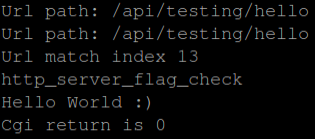
I decided to do a hello world cgi function trying to understand how things work.  To the api_urls I added an entry pointing to a new function called http_tst_api_hello.  I then added that function to the cgirelay.c and cgirelay.h files.  The new function will send “Hello World” out on the serial port using the DBG macro.  The new button shows up on the page, but doesn’t appear to do anything except cause a jump to the top of the page.

I don’t know Javascript, CSS and only a little bit of HTML, this part is going to be a challenge. I did finally get what I was trying to do.  Seems like a small step, but it took a lot of studying and tinkering.

I am not putting any of this code up on github, because I am only taking steps to learn how things work. When I start building in real functionality, then I will start putting this code on github.

Web Page Hello World

Serial Hello World