Firmware Stability with Voltage boost (Firmware V00H)

Since there seems to be some interplay between the SPI overlap mode and the Sigma Delta, I decided to disable the SPI RAM code to see if I can get the Voltage Boost working without crashes.  I used the // comment to make nullify the lines of code pertinent to the HSPI overlap mode.  Most IDEs let you select multiple lines and type CTRL-/ to comment out a block of code, and it toggles between commented and uncommented.

Note: IDE means Integrated Development Environment. Some IDEs are very advanced and checks if your code will compile while your are typing it in.  Others are just a simple editor with an integrated programmer/compiler.  In my case, I am using a program called Eclipse as my IDE.  It is very powerful as a code editor and I could automate compiling and uploading with it, but I have taken an easier path of making a few special shell files to automate the compiling/uploading process.

After commenting out the HSPI overlap code, I verified It would compile and run.  It compiled and ran. Good so far.  Next I started re-enabling the voltage boost circuit a little at a time. First, I turned of the FET allowing the current to flow into the boost circuit.  This is done by pulling GPIO16 low.  I did this by uncommenting two lines at the beginning of serial_init. (I also made a quick edit to a comment that was erroneous) I saved that and tried again. I measured Vpp at 2.75V.

The Sigma Delta Generator was set to a prescaler of 1 and duty of 0 from the last tests I had done.  Next I started changing the prescaler to see if the behavior has changed. 98 .. 99 .. 100 rst cause:2(Failure) Next I thought “maybe it’s the WiFi Modem”, So I disabled the modem.  I added the following three lines to the end of user_init()

    wifi_set_opmode(NULL_MODE);
    wifi_fpm_set_sleep_type (MODEM_SLEEP_T);
    wifi_fpm_open(); // force modem to sleep

98 .. 99.. 100 rst cause:2 (another failure)

Next I set GPIO16 to 1 in user_init() and commented it’s configuration out in seial_init(). Same result. Next I re-enabled system_set_os_print(). Maybe it’ll give me some useful message. No new messages came across the terminal emulator. I commented out the wifi_set_event_handler_cb() line. Still fails at 100.

So user_init() now:

sets the cpu frequency,
configures all the ports, including making sure all pins are disconnected from the sigma delta,
Initializes serial communications,
Initializes the Sigma Delta,
and disables the Modem.

cpu frequency is a system call,
Ports are just register writes,
serial communications are kinda of complex,
Sigma Delta is Just register writes,
and disabling the modem uses system calls.

This points to something in the serial communications.

Looking through the uart code, I noticed the ICACHE_FLASH_ATTR for uart_recvTask();  This is an ISR (interrupt service routine), and they shouldn’t reside in Flash, they should always be in ram.  I commented out the line and tried again. Again, same failure. I decided to sleep on it.

Moving forward, I continued to look at the serial communications code.  I decided to remove all the menu display code and just display the prescaler value with each keypress.  While making this change, I noticed that I had made a string buffer called outBuf of 32 bytes long. I used outBuf to format the Sigma Delta data before sending it out the serial port.  I counted it’s length, with a Duty of 0 and a Prescaler of 100 the terminating null character would be in position 35 of the buffer(That’s a buffer overrun).  I quickly shortened the string to leave the rest of the code intact and tried again.  And that solved it.

I re-enabled the menu.
Still working.

I re-enabled the boost voltage source.
Still working

Set the duty to  51(20%).
It is still working and I measured  2.72V at Vpp (2.72V doesn’t make sense)

Turns out I had both the Vpp drive and grounding transistors turned on causing the low voltage.  I set GPIO5 low and measured again with prescaler set to 4 and duty set to 102, I measured 22V on Vpp. Success!!!(little victory dance there)

I put a //TODO comment in my code to check everywhere I am using a string buffer for possibility of buffer overruns.

Putting a comment that starts with //TODO automatically adds it to a task list in the IDE. I can then go to the tasks list to see these notes. I now have stable but highly crippled code. I have uploaded the current state of the code to Github, click the firmware link in the right column to go get it or look at it.

When you are debugging do you have a technique that works especially well for you. Do you have a technique for finding buffer overruns? I would love to hear about your experiences.

The Man in the Arena

It is not the critic who counts; not the man who points out how the strong man stumbles, or where the doer of deeds could have done them better. The credit belongs to the man who is actually in the arena, whose face is marred by dust and sweat and blood; who strives valiantly; who errs, who comes short again and again, because there is no effort without error and shortcoming; but who does actually strive to do the deeds; who knows great enthusiasms, the great devotions; who spends himself in a worthy cause; who at the best knows in the end the triumph of high achievement, and who at the worst, if he fails, at least fails while daring greatly, so that his place shall never be with those cold and timid souls who neither know victory nor defeat.  –Theodore Roosevelt

This blog is one way I have stepped into the “Arena”.  Of course the dust and sweat and blood are only figurative for me. All that I risk is my pride, and reputation.  Thinking of myself a little less often is always a worthy goal.  My reputation is how I build my client base.  Risking my reputation can have a negative impact on my income.

I was reminded this week that taking risk has some advantages. I listen to multiple podcasts each week.  On the Photography Tips From The Top Floor podcast, Chris mentions that he only does most photo tours “twice only” and refers to an article that explains why.  This article reminded me that by taking chances I am stretching myself, and adding a little spice to what I do.

A software engineer has reminded me several times “If it were easy, anybody could do it.” Just because something is difficult, doesn’t mean I shouldn’t try.  I should weigh the value of trying and failing against “Aiming at nothing” and succeeding. Often, trying and failing is more valuable than not trying. Sometimes the difficult project has very little value to me even if I succeed.

Recently I have been working on a project that requires knowledge of web development.  Because I haven’t had any experience with web protocols, this has been a difficult project.  I didn’t shy away from the project because it was difficult.  However, I have found that I don’t like working in that world. For future projects when web protocols are required, I will hire out that part of the project or not take that part on in the first place.

From this experience, I am still willing to take chances, like making a voltage boost circuit without any experience.  I have also learned an area of programming that I should leave to other professionals.  This voltage boost circuit has been a great learning experience and I am still learning.  I had no idea whether I would be able to make it work or not.  I hope I have encouraged you to take a chance and try something difficult to do.

I have not received any negative comments.  Very few comments at all really.  After doing this for over a year, I had anticipated more interaction with you the readers.  How have you taken a risk recently?  Did you learn from it?  Did you succeed or fail on your goal?

Component analysis (Hardware V00G)

Last week, the voltage boost circuit would barely get above 12 volts.  This would work for most devices but I had set my goal at around 20v. I rechecked datasheets to verify I wasn’t operating out of specification.

Diode D1: The voltage across this diode is really close to 12V when Q5 is on and C14 is charged. From the datasheet, the reverse breakdown voltage(Vr) for and SD103 is 40 V.  This is a fast switching Schottky diode. This is probably not my problem.

FET Q5: The voltage across the drain to source will also reach around 13 Volts when in the off phase of the pulse stream.  The drain to source breakdown voltage is 50 V. This transistor can switch fast enough even at 80MHz.  This is probably not my problem.

Resistor R5: I chose to use 100 Ohms when I populated the PCB.  I am definitely seeing a voltage drop at C17 when driving to around 12 Volts.  If this is the problem, I will not even be able to get to 12V when running on the lithium cell. I think this is causing the problem.

To test this, I decided to change the resistor to 47 Ohms and redo my testing.

I tested with a prescaler of 0, 1, 2, and 4.  With a prescaler of 4 I got 20 volts with the duty set to 51.

Analysis and testing revealed that the filter resistor R5 was too much resistance.  By changing it’s value to 47 Ohms, I was able to get the circuit operating the way I wanted.

I made no changes to the software other than changing the prescaler.  For this firmware, that is a value that I expect to be played with, so no firmware upload this week.  I did change the value of resistor R5 to 47 Ohms.  So I uploaded a new version of the hardware to GitHub.

I would like to see smaller steps between voltages, I am thinking of changing the inductor to a smaller value to improve efficiency and control.  I am not sure this works, but it might be worth a try.

I am still working in an area of electronics I don’t understand very well.  This is the first time for me to design a switching voltage boost circuit.  Do you have any suggestions of how to do it better? How about stories about your own experience with switching power supplies.

Voltage Boost testing

I have a very stable version of the Sigma Delta(ΣΔ) firmware to test with.  I decided to use it to test the Voltage boost circuit.  I started by populating the PCB with the voltage boost components.  Definition: Populate a PCB means installing the components onto a board; this includes but isn’t limited to soldering.

PCBVboost  PCBVboostPop 

Once Installed, I started modifying the code for a simple test. The first test is a sanity check.  I disabled all functions other than sending an incrementing number out the serial port every 5 seconds. And then I ran into another problem.  I had upgraded my install of Ubuntu studio to 16.04 earlier this week and now USB wasn’t working in the virtual machine.  After a few hours of fiddling, I got it working and finally built and uploaded the test code.  The terminal started counting as expected.

Next I turned on the ΣΔ and set the duty to 16. I figured out the prescaler with the following math.  An inductor will reach approximately 2/3 saturation current after a given amount of time calculated by inductance divided by resistance.  I am using a 2 μHenry inductor with an internal resistance of 0.25 Ohms. 2×10^-6 /.25 = 8×10^-6 or 8 μsesonds.  So the most efficient use of the inductor will be between 4 and 8 microseconds. One cycle (pulse width) at 80 MHz is 12.5 nanoseconds. This results in a prescaler of 640 for an 8 microsecond pulse width. If I choose a prescaler of 255, I end up with a pulse width of 3.2 microseconds.  This is a simplified calculation and I hope it will get me close enough.  The PCB resistance, capacitors, and R5 all contribute in varying degrees. I also set GPIO16 as an output and drove it low to enable the voltage booster.  And the code ran as I was hoping for.  I measured the Vpp voltage at 5.93 Volts which is slightly above the 5 volts being supplied by the USB. Yeah! small victory.

The next firmware modification turns on the Sigma Delta and set the duty cycle to 128 (50%) .  I measured 2.75 Volts. So next I read from the ADC each time I sent to the terminal.  The value I read back was 137.  Then I enabled changing the duty with each update. and the values changed with each step.  Very good. Next I did a little math on the data. The ADC reads 1/1024 V/step.  So when I got the reading of 137, that means (137/1024)*20 = 2.675 V.

I get a small error but within 5% reading a meter verses calculated.  I fixed this by changing the 20 to 21.  I got the error because of a 5% error in the calculation of the voltage divider.  I had known about this error, but was ignoring it.  Now it is fixed.  I then started to play with the prescaler to see if i could make it work better.  The 100 Ohm resistor is having more affect on the circuit than I had anticipated.  With a prescaler of 128, Vpp rises to 8V.  At 64 Vpp rises to 11.6 V. At 32 Vpp Rises to 11.6 V again. At 16 the Vpp Rises to 11.6 again.  This suggests the design is limiting the max voltage. I need to check the reverse breakdown voltage on the diode and FET.  I would like to see better control between the steps.  With a prescaler of 0 it Vpp peaked at 12.1 V.  It took more steps to get there, and the steps weren’t linear.  It still needs tuning, maybe a different inductor.

This was fun playing with the Voltage boost circuit.  I actually got it to work fairly well.  This is the first switching boost circuit I have designed from scratch. Of course, I have had a few bumps along the way.  I have uploaded the test code to GitHub.

Have you designed a circuit that was out of you normal area of expertise? I would love to hear about your experience.

Sigma Delta Testing V00A

I have been fighting using the Sigma Delta(ΣΔ) for a few weeks now and all of my research so far has not been fruitful.  So, My intention this week is to implement a very basic ΣΔ operation that will change the prescaler for the whole range of possibilities 0 – 255.

The hardware watchdog timer triggers after about 6 seconds without a WDT reset. I have decided I want the sigma delta prescaler to step from 0 to 255 every 5 seconds.  I will put each step of the prescaler out to the serial port using system calls.

I will put all the code in the user_main.c file so that I, and anyone else that looks at my code can see all that is going on.  I extracted a new set of SDK files into a new folder called SigmaDelta.  I then created a new Eclipse project file in this new folder.    I struggled with creating the project in Eclipse.  I finally got it set up the way I wanted.  In the past setting up a project in Eclipse has always been easier, but this time it just didn’t work well for me.

I copied my shell scripts(that is batch files for windows users) that I use to automate building and testing from the UProgrammer folder. Next, I removed the references to AT_CUSTOM_UPGRADE in user_main.c and user_config.h.  I then performed a sanity check by putting one line of code to send “Hello World” out the serial connection and tried to build.  It failed because I forgot a semicolon.  I fixed that and got a new message saying code will not fit in irom0_0_seg.  I need to update the linker  file.  I copied the one from the UProgrammer folder.  Built again and it compiled. Next I uploaded it to see if it still works.  It doesn’t seem to work.  The baud rate is set to 115200, but I am getting a little bit of garbled text after boot completes.  I decided to try putting a small delay(5 ms) in before printing the “hello World”. This also didn’t work.

I need to implement a timer and looked at the sntp example in the API guide.  I set the timer to repeat every 5 seconds. Unfortunately it seems to just hang. I had a similar problem when I moved to this version of the API, I removed the uart_init line and I started getting regular data coming across the serial line. Still garbled, but happening every 5 seconds.  So I looked at uart_init from the uart.c. I found and copied the call that actually sets the baud rate.  I used this to modify the baud rate for UART0 and I started getting Hello World every 5 seconds.  Next step, turn on the Sigma Delta and start incrementing the prescaler.

I created the variables prescaler and duty and set them to 0. Then I went back to my old code and grabbed a copy of the set prescaler code.  I put the code in to set the prescaler, increment it, and print out the value every the timer event is called. I compiled, uploaded it and I saw numbers increasing across the serial terminal.  Then I waited for it to get to 100.  It continued to count.  I let it continue all the way up to 255 and then changed the wifi mode to STATION_MODE like the UProgrammer firmware. Next, I modified the code to turn on the output(GPIO4) and change the duty cycle.

Still working. Connected to wifi and tested again. Still working.  I explicitly set GPIO4 as an output set to 1 and tried again. Still working I turned on HSPI overlap mode and tried again. It started crashing and rebooting.  It looks like somehow the HSPI is conflicting with the SigmaDelta generator.

I commented out the code to set up GPIO4, and the code to connect to the wifi access point and it crashes. I changed the duty back to 0 and it doesn’t crash anymore. Next I checked the Pin assignment worksheet to see what else is connected to GPIO4 and I didn’t find anything interesting.

It looks like I have to do an HSPI overlap deinit immediately after getting data out of the RAM.  This could be a problem because I want to be generating Vpp while transferring data into the processor.  This could limit my options.  If my code is small, I can generate Vpp. If it’s large, I may have to program in blocks.

I do have the capabilities to assemble and test the voltage booster now.  I will go back into the UProgrammer Firmware code and deinit the HSPI overlap and see what happens.

I have put this week’s test code on GitHub here. How do you find problem code?

Sigma Delta still causes reboots Firmware Version 00E

I was hoping but not expecting the SDK Update to fix the Sigma Delta problem.  So first thing I did this week was to test.  Same failure as before.  I had two Ideas this week that might be an answer to the problem.  On another project, I was using the Arduino IDE to develop a little weather station project.  In it, I was using old code that set certain pins as output.  Those pins were/are tied to the SPI bus and was causing it to reboot.  Maybe, there is a pin set to have Sigma Delta(ΣΔ) output that is also tied to a critical pin.  My second thought is that if the ΣΔ is causing interrupts, I should disable them.

A good practice for microcontroller programming is to always set up all I/Os immediately after a reset.  I have gotten sloppy and haven’t done that with this project. If a pin is connected to the ΣΔ that shouldn’t be, this will fix that.
I started by writing down what each pin will do in the design. I referred to the schematic for each pin.

Pin 18 GPIO0 -- Output -- controls analog switch
Pin 22 GPIO1 -- Output -- TxD0
Pin 17 GPIO2 -- Output -- sets VPP output high
Pin 21 GPIO3 -- Input -- RxD0
Pin 19 GPIO4 -- Output -- ΣΔ pulse stream to generate Vpp
Pin 20 GPIO5 -- Output -- Sets Vpp output low
Pin 14 GPIO6 -- Output -- SCLK (SPI and HSPI overlap) (need to verify Pin number for ESP12F)
Pin 10 GPIO7 -- BiDir -- MISO (SPI and HSPI overlap) (need to verify Pin number for ESP12F)
Pin 13 GPIO8 -- BiDir -- MOSI (SPI and HSPI overlap) (need to verify Pin number for ESP12F)
Pin 11 GPIO9 -- BiDir -- QIO2 (SPI and HSPI overlap) (need to verify Pin number for ESP12F)
Pin 12 GPIO10 -- BiDir -- QIO3 (SPI and HSPI overlap) (need to verify Pin number for ESP12F)
Pin 9 GPIO11 -- Output -- CS0 (SPI) (need to verify Pin number for ESP12F)
GPIO12 -- BiDir  -- Data to target device
GPIO13 -- BiDir  -- Data to target device
GPIO14 -- BiDir  -- Data to target device
GPIO15 -- Output -- Chip Select for HSPI
GPIO16 -- Output -- Disables Vpp generation

I went into the user_init() function and removed all the commented out code leaving an example of the PIN_FUNC_SELECT() macro. I then set GPIO_PIN0 – 15 registers to 0 which disables interrupts and disconnects the ΣΔ output.  I compiled the code and uploaded it and it crashed.  To find the new problem I caused, I commented out all the new code except setting the GPIO registers to 0. I rebuilt and uploaded the code and … a continuous stream of reboots.  I commented out setting the GPIO registers to 0 then put the PIN_FUNC_SELECT() back in. And … reboots slowly.

I removed the function selects that should be controlled by the API anyhow(GPIO6-11). And … I found a typo on the GPIO6 function select. I fixed the typo, rebuilt, uploaded and it ran at least as well as last week.  I then started testing to see if it fixed the ΣΔ issue. The reset problem still exists.

Next I set a subset of the GPIO registers to a value of 0  I decided to go with the first 8 to see what would happen. Same failure, a stream of reboots. Then I noticed I wasn’t writing to the correct register locations.   I fixed this and then recompiled, uploaded, and code is running, but ΣΔ is still causing a reboot if i set the prescaler to greater than 99.

Next I started looking at the ΣΔ interrupt structure.  Unfortunately it has very little documentation that I have found so far.  I used google to search for articles pertaining to the use of the Sigma Delta and found very little.  My next step is to do a little experimentation. I decided to disable the ΣΔ while changing the prescaler.  I got the same results.  It’s time to make a Hello World program for a sanity check. It would be the minimum to set up and test functionality of the ΣΔ on GPIO4.  If it works correctly, then I have to take a deeper look at my code, if it doesn’t, I’ll have something to post to Espressif’s forum for help.

Have you had similar problems with a chip you have never used before?  I have uploaded the current code to GitHub. Use the link at the top of the right hand column to get the download.

Update to SDK 1.5.4 Firmware V00J

Since I don’t seem to be making any progress on the Sigma Delta output, I decided to update my copy of Espressif’s API. I went to bbs.espressif.com and clicked on the SDKs thread under the heading DOWNLOADS. In the list i looked for the most recent Non OS SDK release.  I saw that ESP8266_NONOS_SDK_V1.5.4_16_05_20 is the most recent release. It’s file name indicates a release date of May 20th 2016.  I downloaded the zip file and extracted the contents.

To Make moving forward a little easier, I renamed the SDK folder to UProgrammer.  This will help me maintain paths the next time I move to a new SDK Version.  Each time I update to a new SDK, I will Rename the OLD SDK folder to indicate it’s version number, and rename the new SDK folder to UProgrammer.  To maintain compatibility with Github’s folder naming, I will continue to keep the UProgrammer-Firmware folder name for the project files.  This folder will be sitting in the SDK folder I just renamed to UProgrammer.  I then created an empty text file with the name of the SDK file to mark the version I am working in.  Then I copied the hidden file .metadata from the old SDK folder into the new (UProgrammer) SDK folder.

I opened eclipse and pointed the workspace to the UProgrammer folder and it loaded the files as if I hadn’t changed anything. Then I made edited the comment block at the top of the file to indicate I had moved to NONOS SDK V1.5.4.  I saved the file and then checked the file in the new directory structure for the changes. It has the change I had just made.  To make sure there wasn’t something weird going on, I also checked the file in the old directory structure. It was unchanged.  I had planned on dealing with more problems just in case they happened.

I compiled the code to see if anything broke moving to the new SDK.  Things definitely broke. First the files all compiled but linking failed.  The first error message was:

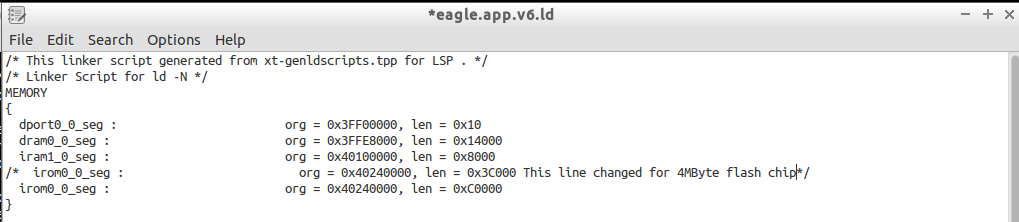
section `.irom0.text' will not fit in region `irom0_0_seg'

This reminded me that I modified the linker file eagle.app.v6.ld to allow for more room for the code space in a 4MByte flash chip.  I made the modification to the new file and saved it.

Modified linker file

I tried compiling again.  Again it failed to link but I was no longer getting the memory failure. This time the first error message was:

 undefined reference to `uart0_sendStr'

I didn’t have the most recent programming reference, so I went back to bbs.espressif.com to download it.  I got the 2C-ESP8266_SDK_API Guide_EN_1.5.4.pdf.  It turns out uart0_sendStr() isn’t in the documentation.  So I looked in my code to find it.  I found the prototype for it in uart.h. but it doesn’t appear anywhere else. This makes me wonder how I was compiling last week.  I did find it in uart.c in the drivers folder.  At one time that file was part of the project. I am guessing the object file was still getting linked in to the project.  The compiled object files are in hidden folders and didn’t get copied by default.  (It’s a good thing.  The versions of code on Github would not have worked. Now they will get fixed.)  I copied The code for uart0_sendStr() into simple_serial.c and recompiled expecting it to fail because uart0_sentStr() calls something else in uart.c.

Again I looked at the first error from the linker which was:

../lib/libat.a(at_ipCmd.o): In function `at_set_rx_buf_state':
(.irom0.text+0x10ac): undefined reference to `espconn_secure_sent'

I am not using any secure features or any AT functions, so I decided to look at the make files. I used a Linux tool called meld to compare files.  There were very small differences.  Looking at my makefile, I noticed four lines that effectively added the -lat linker option.  I commented out those 4 lines and recompiled.  Now the linker only has 4 errors remaining, all of which can be fixed by copying code from the uart.c file.  After copying each function I needed from uart.c, I finally got a successful compile of the code.  I then uploaded it to the PCB to see if it still runs.  It ran the wrong code.  I now get a message in the serial terminal “dmode : softAP (XXX) indicating it is booting up as an access point.

I was able to connect to the device and dhcp worked, but an attemp to connect by http was refused.  Since the messages are system messages I decided to try a UART Swap. No change in the behavior.  I need to do a sanity check, this is a new API so back to doing a Hello World test. I finally got confirmation that my code is what is being uploaded to the module.  I placed the following function call:

system_set_os_print(0); // Turn off System Messages

into the code. I am no longer getting any output in the terminal.  I wasn’t getting any error from compiling but it turns out the function uart_tx_one_char() needed to be copied from the uart.c to simple_serial.c I chose not to have uart.c to reduce code size, there is a lot of code in uart.c that I will never use.

I cleaned up some of the things I tested recompiled and posted a new copy to Github. Do you have any tips for migrating between environments? I’d love to hear about them.

Sigma Delta still causing resets.

When I first built this revision of PCB, the board would reboot a lot.  That turned out to be the mis-wiring of the SPI RAM.  Part of that process in trouble shooting that board, I had guessed that I had a noisy power connection to the Wi-Fi module. So one thing that I had tried was adding a large reservoir capacitor and a small filter capacitor near the power pins of the module. Unless I am drawing too much current from the voltage regulator, this should eliminate any possible power issues.

This means my first test is to measure how much current is being drawn from the voltage regulator.  To do that I removed the jumper that bypassed the lithium cell charger and attached 3.7V to the PCB from a bench power supply.  To do this I removed all the test pins I had soldered to the module and soldered one to +BATT and another one to GND.  I connected my meter in series with the power supply and turned it all back on.  I measured the current consumed between 75 and 80 mA for the whole range of 0 to 99 prescaler.  This measurement was made with the radio inactive.

I think I can rule out the power supply as my problem.  Next I decided to change the software to take steps of 10 instead of 1 for adjusting the prescaler.  If the failure is because of an accumulated error, this should happen later and I should be able to get a number larger than 100 without a failure. I re-soldered the  bypass of the Lithium Cell charger and uploaded the change. I got to 91 No Failure. At 101 it still failed.  I change the step to 30 and when I got to 120, I got a reset cause:2. (maybe there is a clue here, This means external reset.)  I found this in the 2c-ESP8266_SDK_Programming Guide.pdf file from the Espressif BBS.

There are two pins on the module that can be used for external reset.  Since the serial to usb bridge is controlling the reset line, I decided to look into the EN pin first. It looked good with the right resistor in place to pull it up.  I then started looking through the code to make sure the Sigma Delta was configured to the correct pin.  Turns out that it wasn’t configured to output on any pin.  There was a missing statement in the code setting pin4 to output the sigma delta channel.  I added that line back in, saved, recompiled, uploaded and tested again. It still is failing.

Going back to the external reset, I decided to put lower value pullup resistors on the reset lines. I changed them from 10 K to 1 K.  This should reduce any affect of noise on the pins and still not draw too much current when pulled low. It still fails in the same way.  I have another project where the sigma delta is working very well.  The main difference I can see is that on this project I am reading the sigma delta twice before I write to it. In my other project, it reads the register once.  So I am going to make a simple uint8 variable to retain the value I am writing to the Sigma Delta prescaler.

It is still not fixed.  Have you seen this problem? Have you solved it?


Sigma Delta Testing V00I

Last Week I wrote to  and read from the SPI RAM but only verified it with a logic analyzer.  I read from the registers and sent them out on the serial line. Like before, I did a hello world test and actually expected to see hello world after the menu. It didn’t work, I forgot to take care of several things in the software. I adjusted the software a little at a time testing with each change until it started working.

Once I saw “Hello World” in my serial console, I decided to start testing the Sigma_Delta output.  I want to know if it causes system crashes without the voltage boost circuit having any connection to power. Without R5 or L2 installed, the boost circuit really can’t have much affect on the system. Q5 also isn’t installed so the Sigma Delta output on GPIO4 is driving to high impedance.

I changed the firmware so that GPIO4 is the Sigma Delta output.  Then I un-commented out the line in user_init() that configures and enables the Sigma Delta output.  Before, I had a very limited range of prescaler I could use for the Sigma Delta signal. I can set the sigma delta prescaler from 0 to 100.  I was expecting to get full range which would be 0 to 255.  So I went back into the software and looked to see if I made a math error.  The math is simple and it looks right so I decided to look at the Sigma Delta register definition.  The register definition matches the way the code is written.  I checked Kolban’s ESP8266 book, it didn’t have anything useful about the Sigma Delta.  I looked for it in Espressif’s  SDK programming guide and found nothing. Next I searched using Google. This turned up the page I had originally found on Espressif’s bbs.  It describes the prescaler being a value of 0 to 255. So I still don’t know why going bigger than 99 causes the system to crash.  It is not clear what is causing this rebooting.

I will look at the Sigma Delta software more next week. I have uploaded the current status of the code to GitHub.

I would love to hear from you readers.  The only comments I get are spam!

Switching to SPI from HSPI Firmware V00I

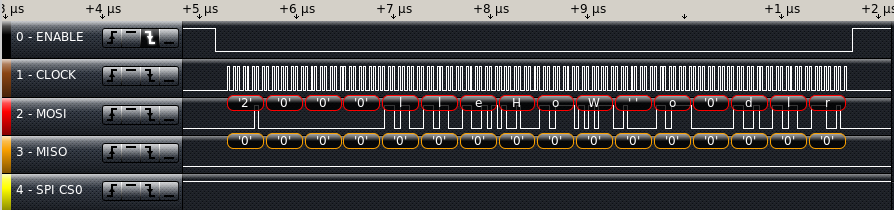
I decided to try to use the SPI module instead of overlap mode this week.  I went into the code that writes and reads from the SPI and changed the working registers to SPI in place of HSPI. I had to store and restore 6 variables in the writeRam() and readRam() functions.  It worked but sent more data than expected. I noticed that I left the overlap init code in place, I removed it and tried again. I still got more data than I expected. I searched for HSPI and found one place that I had forgot to change it to SPI. I fixed that and now it is working. The code is also working without crashing.

SPI Write Hello World

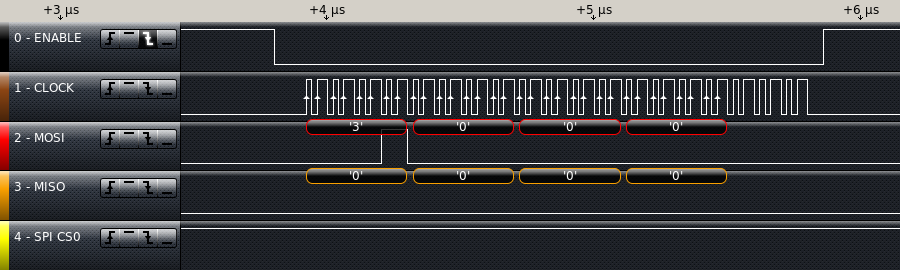
Next I added the read function back into the main code to see what would happen. I saw only 4 bytes on the SPI bus. I had missed a value change I needed to make the SPI read 12 bytes.    It seems that either the DMA or an Interrupt routine is taking control of the SPI Hardware before i can finish a read. I disabled interrupts and it’s still only sending the command (3) and the address (0) plus 6 more clock cycles.

Incomplete SPI Read

Since SPI is used for loading code into internal RAM as well as running it directly from flash, it might be difficult to figure out when I can use it for the SPI  RAM.  I had the HSPI appearing to work in overlap mode.  Since I can switch between overlap and normal mode on the fly, maybe the HSPI in overlap mode is the best choice. In the writeRam() and readRam() functions, I changed the all references to SPI Registers to HSPI Registers and I commented out the code to save and restore the SPI Registers.  I used find and replace to simplify the changes.  I searched on (SPI) and filled in the replace with (HSPI) and then I selectively hit REPLACE/FIND for each instance.

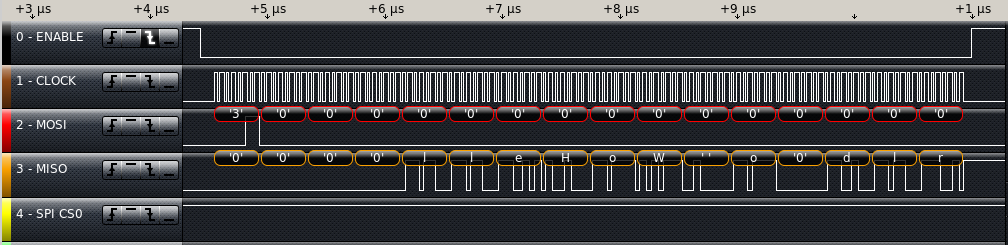
Then I built and tested the code, hopefully back to where I was last week.  I got all zeros but I hadn’t done a write since I started working on it this time. So I put the writeRam() just before the readRam() in user_init() and tried again. On the logic analyzer, the write looks exactly like I would expect. The read is still not getting anything but zeros for the data section.  Next step is to look at the HOLD and WP lines on the SPI RAM. I had to look at the datasheet to see what state they needed to be in to work correctly.  Looking at the datasheet, there is no WP line, but there is a HOLD line.  If HOLD is low, the serial interface of the chip doesn’t work.  I clipped one more logic analyzer line on to Pin 7 of the SPI RAM.  The signal looks identical to MOSI.  I should have cut the trace when I was re-wiring this board but I missed it. I proceeded to cut it and add a jumper from the HOLD line to the ESP12E Pin 11. this is my best guess for the pins to use SQI. With Re-testing I got a successful read from the chip.

SPI Successful read

Next week, I need to verify the SPI working registers have the expected values from the ram.  I put the current version of the code up on GitHub.

How do you handle cutting in circuit changes?  Do you have any stories about a design change only to find it best to go back to the original plan?